Network settings
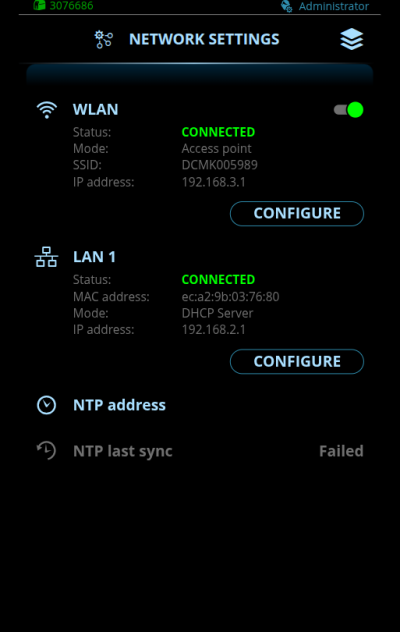
Changing settings
| 1. | To access your network's IP settings, select Configure. |
| 2. | Select the settings parameter for adjustment. |
| 3. | Select the settings value. |
>> Depending on the settings parameter to be adjusted, refer also to the Network settings table below for more details.
| 4. | Confirm the new value / selection and close the adjustment view by selecting Save. |
WLAN IP configuration - access point mode
| Parameter | Value | Description |
|---|---|---|
| WLAN | ON/OFF | WLAN ON/OFF selection. |
| Status | Connected / Not connected | Indicates whether a device (PC, tablet, mobile device) is connected to DCM 2.0. |
| Mode | Access point |
DCM 2.0 acts as an access point to which other devices (PC, tablet, mobile device) can connect. |
| SSID | Default = DCM<DCM serial number> | The SSID (Service Set Identifier), i.e. the name of the WLAN network offered by DCM 2.0. |
| IP address | Default = 192.168.3.1 | WLAN IP address of DCM 2.0. |
| Security protocol | WPA2 |
Security protocol for the WLAN. |
| Password | WLAN password. |
WLAN IP configuration - client mode
| Parameter | Value | Description |
|---|---|---|
| WLAN | ON/OFF | WLAN ON/OFF selection. |
| Status | Connected / Not connected | Indicates whether the DCM 2.0 is connected to the WLAN network. |
| Mode | Client |
DCM 2.0 connects to the existing WLAN network. |
| SSID | Local wireless network's SSID (Service Set Identifier), i.e. the name of your WLAN network. | |
| IP address | E.g. 172.31.0.113 | WLAN IP address for DCM 2.0. |
| Subnet mask | E.g. 255.255.252.0 | DCM 2.0 subnet mask. |
| Gateway | E.g. 172.31.0.1 | IP address of the WLAN router. |
| Primary DNS | E.g. 8.8.8.8 | IPv4 address of Primary DNS server. |
| Secondary DNS | E.g. 8.8.4.4 | IPv4 address of Secondary DNS server. |
| Security protocol | OFF/WEP/WPA2 |
Security protocol for wireless networks. |
| Password | WLAN password. |
LAN 1 IP configuration
| Parameter | Value | Description |
|---|---|---|
| Status | Connected / Not connected | Indicates whether the DCM 2.0 is connected to the LAN network. |
| MAC address | ec:a2:9b: <03:76:51> |
The unique address of DCM 2.0 allocated by Kemppi. |
| Mode | Static IP / Client / DHCP server Default = DHCP server |
Static IP: DCM 2.0 is allocated a fixed IP address. Client: DCM 2.0 requests an IP address from the DHCP server. DHCP server: DCM 2.0 allocates IP addresses to external devices that are connected to the same network interface and operate in the DHCP client mode. |
| IP address | Default = 192.168.2.1 |
IP address for DCM 2.0. |
| Subnet mask | Default = 255.255.255.0 | DCM 2.0 subnet mask. |
| Gateway | E.g. 10.0.0.125 / Empty | IPv4 address of the gateway (if used). |
| Primary DNS | E.g. 10.0.0.125 / Empty | IPv4 address of Primary DNS server. |
| Secondary DNS | E.g. 10.0.0.125 / Empty | IPv4 address of Secondary DNS server. |
NTP (Network Time Protocol) configuration
| Parameter | Value | Description |
|---|---|---|
| NTP address | Default = 1.kemppi.pool.ntp.org | This is the address of the NTP server. NTP is used to synchronize the system time of DCM 2.0. |
| NTP last sync | The date and time of the last successful time synchronization. |